Introduction
Features
The newly developed Yamaha Diagnostic System provides quicker detection and analysis of engine malfunctions for quicker troubleshooting procedures than traditional methods.
By connecting your computer to the ECM (Electronic Control Module) of an outboard motor using the communication cable, this software can be used to display sensor data and data stored in the ECM on a computer’s monitor.
If this software is run on Microsoft Windows® 95, Windows 98, Windows Me, Windows 2000, or Windows XP the information can be displayed in colorful graphics. Also, the software can be operated using either a mouse or a keyboard.
In addition, the data for the main functions (Diagnosis, Diagnosis record, Engine monitor, and Data logger) can be saved on a disk or printed out.
Functions
Diagnosis: With the engine main switch ON, each sensor’s status and each ECM diagnosis code or item is displayed. This enables you to find malfunctioning parts and controls quickly.
Diagnosis record: Sensors that had been activated and ECM diagnostic codes that have been recorded are displayed. This allows you to check the outboard motor’s record of malfunctions.
Engine monitor: Each sensor status and the ECM data are displayed while the engine is running. This enables you to find malfunctioning parts quickly.
Stationary test: With the engine off, the ignition, fuel injection, electric fuel pump, and ISC valve are checked. These tests can be performed quickly.
Active test: With the engine running the ISC valve is checked.
Data logger: Displays 13 minutes of recorded data for two or more of the items stored in the ECM. In addition, the operating time as compared to the engine speed and the total operating time are displayed. This allows you to check the operating status of the engine.
Some files: Lets you select and run other applications while continuing to run the diagnostic program.
Contents
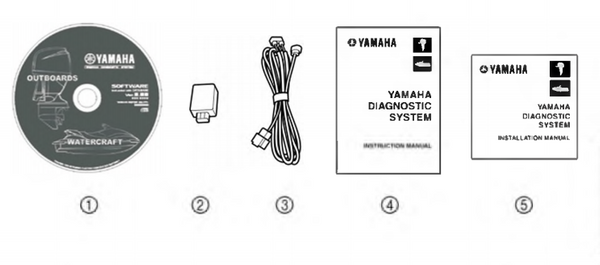
- Software (1)
- Adapter (1)
- Communication cable (1)
- Instruction Manual (1)
- Installation Manual (1)
Hardware requirements
Make sure that your computer meets the following requirements before using this software. Computer: IBM-compatible computer
Operating system: Microsoft (Windows 95,) Windows 98, Windows Me, Windows 2000, or Windows XP (English version)
CPU: Windows 95/98: i486X, 100 MHz or higher (Pentium 100 MHz or higher recommended)
Windows Me/2000: Pentium, 166 MHz or higher (Pentium 233 MHz or higher recommended)
Windows XP: Pentium, 300 MHz or higher (Pentium 500 MHz or higher recommended)
Memory:
Windows 95/98: 16 MB or more (32 MB or more recommended)
Windows Me: 32 MB or more (64 MB or more recommended)
Windows 2000: 64 MB or more (128 MB or more recommended)
Windows XP: 128 MB or more (256 MB or more recommended)
Hard disk free space: 20 MB or more (40 MB or more recommended)
Drive: CD-ROM drive
Display: VGA (640 x 480 pixels), (SVGA [800 x 600 pixels] or more recommended) 256 or more colors Mouse: Compatible with the operating systems mentioned above
Communication port: RS232C (Dsub-9 pin) port, USB port
Printer: Compatible with the operating systems mentioned above
• The amount of memory and the amount of free space on the hard disk differs depending on the computer.
• Using this software while there is not enough free space on the hard disk could cause errors and result in insufficient memory.
• This software will not run properly on some computers.
• When starting up this program, do not start other software applications.
• Do not use the screen saver function or the energy saving feature when using this program.
• If the ECM is changed, restart the program.
• Window XP is a multiuser operating system, therefore, be sure to end this program if the login user is changed.
• The USB adapter cannot be used with Windows 95.
For operating instructions of the Yamaha Diagnostic System, refer to the “Yamaha Diagnostic System Instruction Manual.”
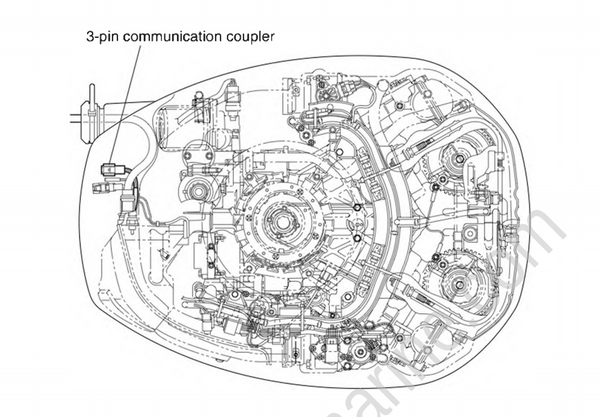
Connecting the communication cable to the outboard motor
• To diagnose a mechanical malfunction, use the troubleshooting charts pertaining to the trouble located in this chapter. Also, when checking and maintaining the outboard motor, see Chapters 4 8 for safe maintenance procedures.
• Check that all electrical connections are tight and free from corrosion, and that the battery is fully charged to 12 V.
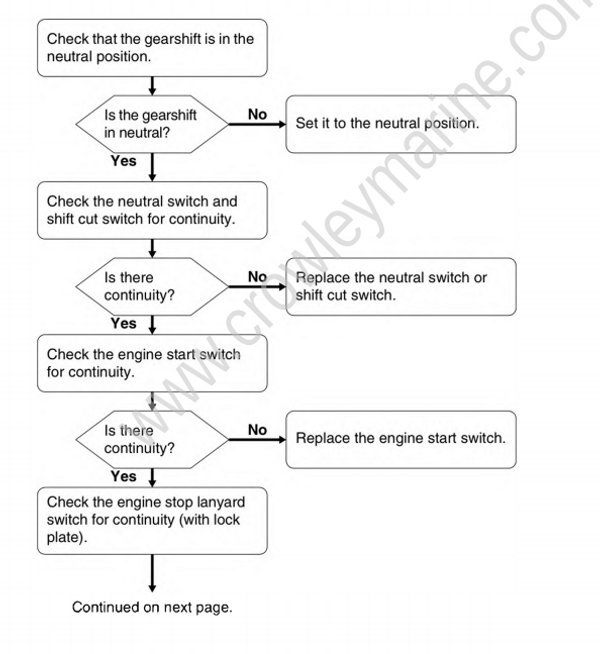
• To diagnose a malfunctioning sensor or switch, use the diagnostic flash indicator to determine the cause.
Power unit
Symptom: Engine does not crank.
- Check the starting system.
- Check the power unit.