

EMM Replacement
Before installing a new EMM, program information from the original EMM must be saved to a computer data file. Refer to EMM Transfer on p. 91.
After the new EMM is installed on the outboard, apply power to EMM. Select Prep New EMM from the Utilities Menu. Follow the instructions provided with the pro gram to load engine software and transfer EMM data.
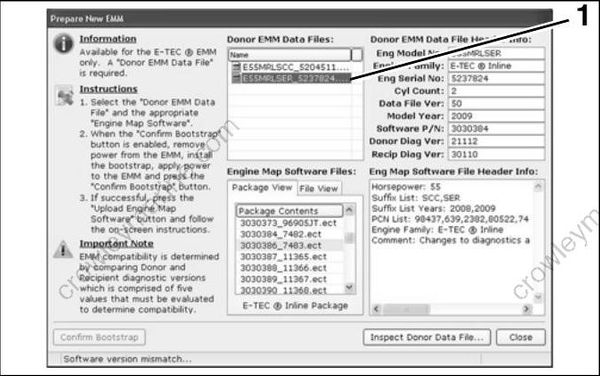
008663
- Select engine serial number file
IMPORTANT: If more than o ne file is listed , be sure to select the engine data file (.edf) t hat matches the engine serial number.
IMPORTANT: Whenever the EMM is rep laced, EMM timing must be synchronized to crankshaft position. Refer to TIMING ADJUSTMENTS on p. 124.
EMM Servicing
Removal
IMPORTANT: If a n ew EMM is being installed, refer to EMM Transfer on p. 91.
Disconnect cooling hoses from EMM.
Disconnect J1-A, J1-B, and J2 connectors.
Remove three EMM retaining screws a nd washers. Remove EMM.
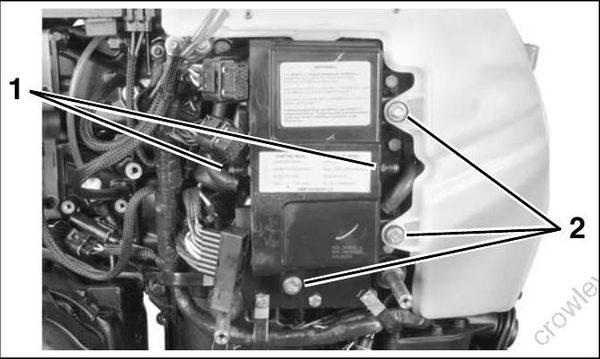
006476
- Cooling hose connections
- EMM mounting screws
Remove EMM from behind oil tank bosses.
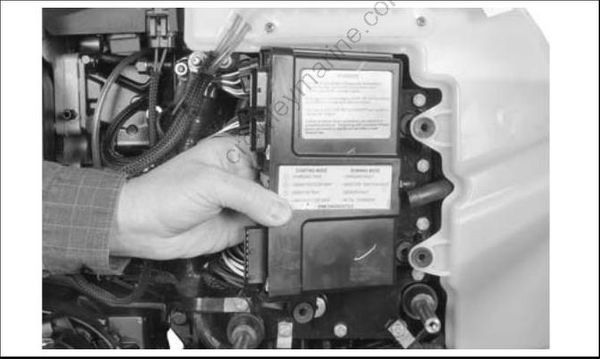
006477
Installation
Installation is the revers e of removal. Pay close attention when performing the following tasks.
Make sure isolator mounts are placed in slots in of EMM case. Slide EMM into position.
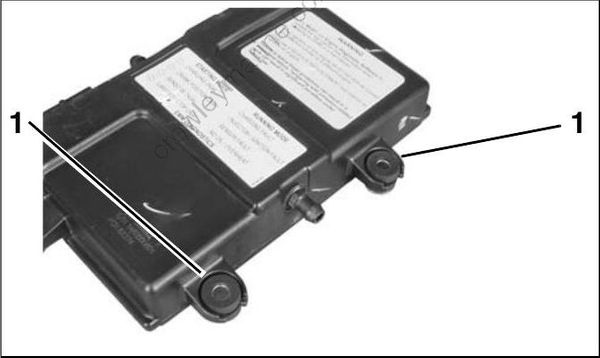
006478
- Isolator mounts
Apply Nut Lock to threads o f EMM retaining screws. Tighten to a torque of 30 to 42 in. lbs. (4 to 5 N·m).
Install harness connectors and cooling hoses. Secure hoses with tie straps.
