ICON SYSTEM SETTINGS
In a multi-engine application, the transom position of the outboard must be identified on the network.
Engine identity is se t by a n Engine Identity Plug installed in the ESM. Outboard s are identified as Instance 0 through 4, from port to starboard, up to five engines.
Each identity plug is stamped with it s instance number.
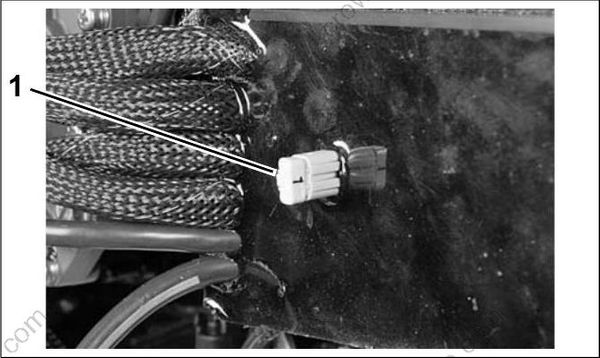
- Engine Identity plug 007505
If the outboard is a single engine or the port engine in a multi-engine application, no changes are required.
For all other outboards, engine identity must be set by replacing the original plug (0) with the plug that corresponds to the outboard’s position on the transom.
| Identity Numbers | |||||
|---|---|---|---|---|---|
| Number of Out-boards | troP | troPretneC | retneC | draobratSretneC | draobratS |
| 1 | 0 | ||||
| 2 | 0 | 1 | |||
| 3 | 0 | 1 | 2 | ||
| 4 | 0 | 1 | 2 | 3 | |
| 5 | 0 | 1 | 2 | 3 | 4 |
IMPORTANT: The Engine Identity Plug overrides any previous EMM instance setting.
Calibrate Actuator Stroke
After installation, dealer MUST us e Evinrude Diagnostics software, version 5.1 or higher, to calibrate the actuators for correct throttle and shift stroke. Failure to calibrate shift stroke will lead to gearcase failure and possible loss of boat control not covered by warranty
To calibrate the actuators, use the ICON tab of the Evinrude Diagnostics Settings screen.
In a multi-engine application, all outboards can be calibrated through one connection. Use the
Engine Instance menu to select the engine instance on the screen.
IMPORTANT: If the ICON t ab is not available, make sure the engine management software has been updated to the correct revision.
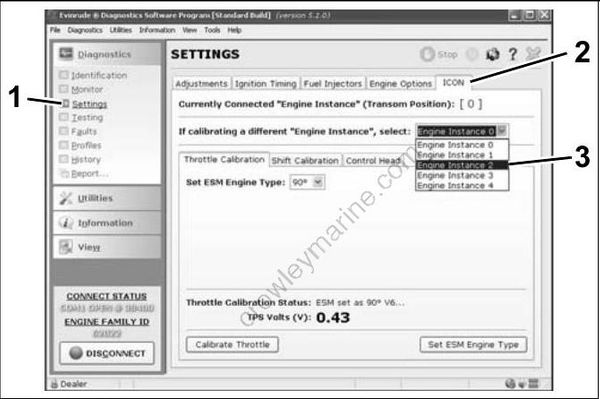
- Settings
- ICON tab
- Engine instance menu
008578
Throttle Actuator Stroke
To set throttle stroke, click the Calibrate Throttle button. Th e actuator arm will move forward an d back to find the mechanical limit s of the throttle
linkage. Evinrude Diagnostics report s when the process is complete.
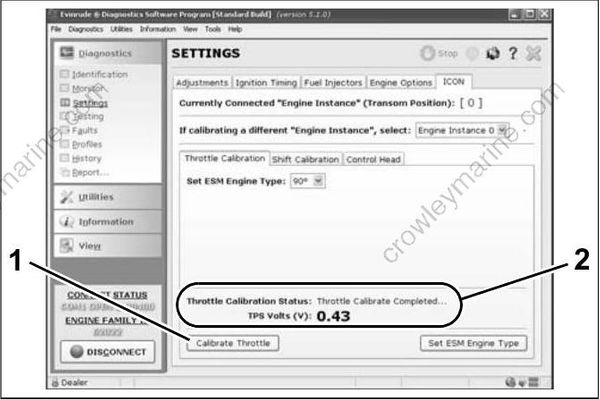
- Calibrate Throttle button
- Process complete message
008583
Shift Actuator Stroke
To set forward gear shift stroke:
• With the shift link disconnected, rotate the propeller and manually shift the outboard into forward gear with the shift lever.
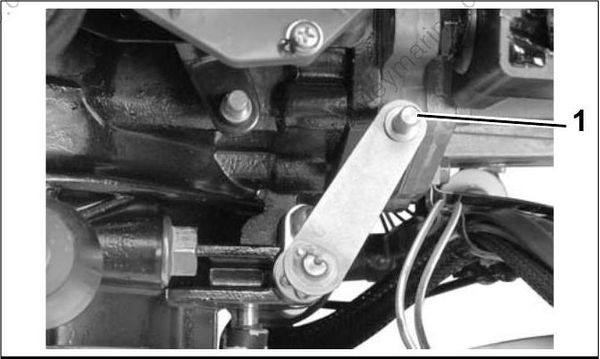
- Shift lever in forward 008510
IMPORTANT: Make sure the gear is fully engaged and the lever is all the way forward.
• Select FOR WARD under Shift Position on t he ICON screen. The actu ator arm will move forward.
• Use the Nudge buttons to move the actuator arm forward or backward until the shift link aligns with the actuator arm and shift lever pins.
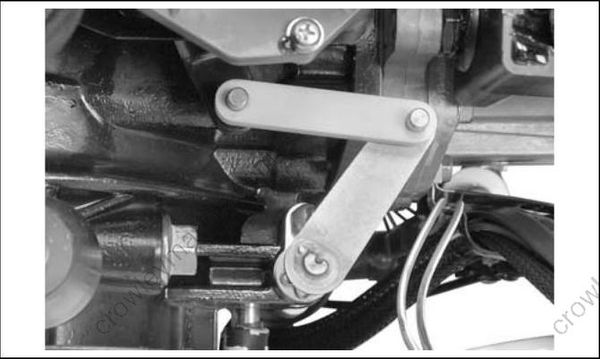
• When the link and pins are exactly aligned, install the link a nd click the Save button . The actuator will move to the neutral position.
- Shift position
- Nudge buttons
- Save button
008579
008511
To set reverse gear shift stroke:
• Remove shift link.
• With the shift link disconnected, rotate the propeller and manually shift the outboard into reverse gear with the shift lever.
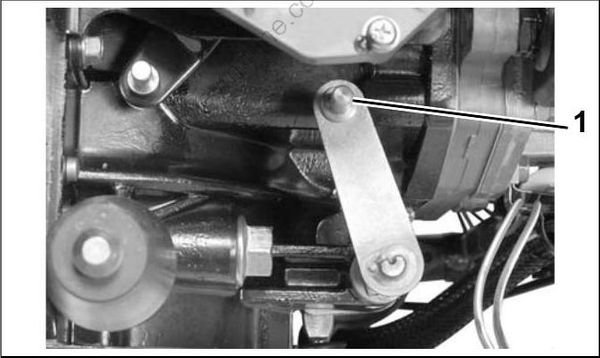
- Shift lever in reverse 008512
IMPORTANT: Make sure the gear is fully engaged and the lever is all the way to the rear.
• Select REVERSE button under Shift Positoin on the ICON screen. The actuator arm will move backward. Use the Nudge buttons to align the shift link.
• When the link an d pins are exactly aligned, install the link a nd click the Save button. The actuator will move to the neutral position.
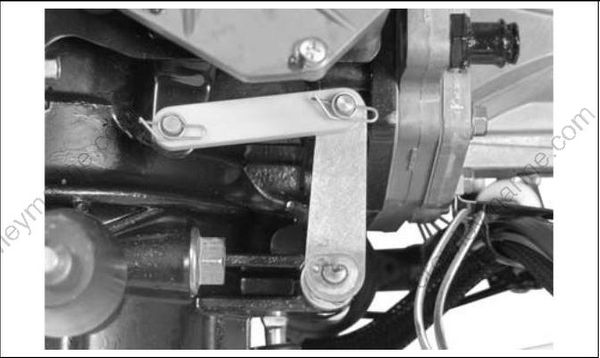
008513
After forward and reverse strokes have been calibrated, the ESM calculates neutral position.
Install the shift link and secure with retainer clips and washers.
008509
Lock the retainers by moving the angled section behind the straight section.
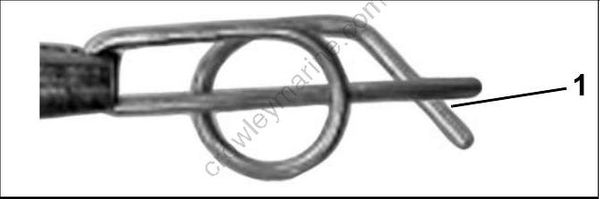
Locked Retainer Clip
- Angled section behind straight section
DP0817a
When installation is complete, shift the outboard with control (while rotating propeller). Rot ate the propeller s haft b ack a nd forth to ensure the face of the clutch dog contacts the gear in both forward and reverse. With the outboard in neutral, make sure the propeller shaft turns freely with no contact between the clutch dog and gears.
ICON System Faults
The ICON System exhibits two types of faults: Recoverable and Non-recoverable. ICON System faults are visually indicated by the remote control, the switch panels, the gateway, and the 6-po rt hub LED’s. ICON System faults are also displayed on the Faults page of Evinrude Diagnostics and on the NMEA
2000 gauges.
Recoverable Faults
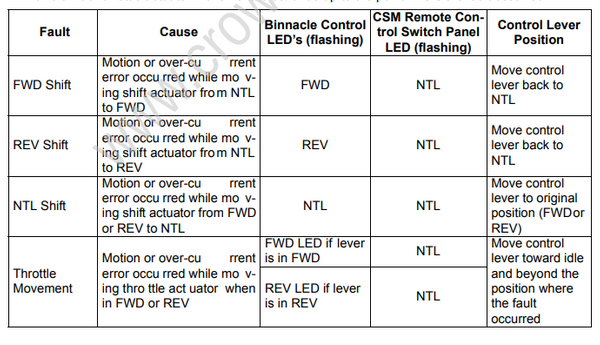
Recoverable faults are Motion or Over-Current errors which occur on a throttle or shift actuator. A motion error occurs when the ESM is attempting to move an actuator from one position to another, but the actuator does not move. An over-current error occurs when the ESM is moving an actuator and the actuator
draws too much current.
When recoverable fault s are detected the remote control continues to se nd shift, throttle, trim, a nd
start/stop commands as normal.
During a recoverable fault, the ICON System:
• Flashes a gear LED of the affected engine one time per second to indicate the gear position command that caused the fault.
• Sends a fault message to the outboard EMM. The EMM then sends a “Check Engine” message to the NMEA 2000 gauges.
• Stops shift or throttle actuator movement at the point where the fault occurred
• Will NOT activate S.A.F.E. When all control levers are put in NEUTRAL, the ICON System
• Stops flashing the FORWARD and NEUTRAL gear LED’s
• Continues to flash the NEUTRAL LED of the faulty engine one time per second
• Allows shift or throttle actuator movement to continue up to the point where the fault occurred
Non-recoverable Faults
When a non-recoverable fault occurs, the ICON System:
• Flashes all gear position LED’s of the affected engine five times per second
• Sends a fault message to the outboard EMM, which in turn sends a “Check Engine” message to the NMEA 2000 gauges
• Activates S.A.F.E.
• Moves throttle actuators to idle, and shift actuators to NEUTRAL, if they are functional
When all control levers are put in NEUTRAL and all engines are in NEUTRAL-idle, the ICON System:
• Stops flashing the FORWARD and NEUTRAL gear LED’s
• Flashes the NEUTRAL LED of the faulty engine five times per second if the condition is ESM or actuator related
• Turns OFF all gear LED’s of the failed remote control lever, if the fault is lever-related
• Disables the faulty control lever or ESM
• Allows unaffected control levers and ESM’s to operate normally
• Retains SYNC function for non affected engines
If a port control lever has failed, starboard lever becomes the lead for SYNC.
If starboard control lever has failed, port lever becomes the lead for SYNC.
Station transfer is not allowed when a non-recoverable fault is present. The ICON System remains in this state until power is reset.
Operation stops if the control lever fails on a single binnacle or concealed side mount remote control
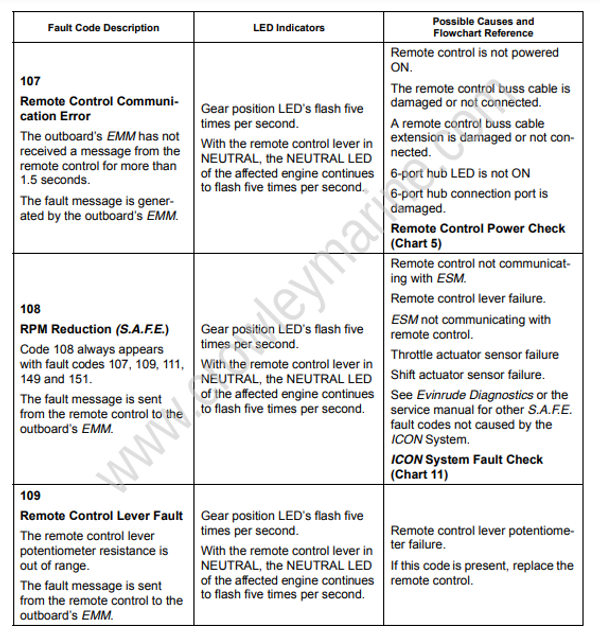
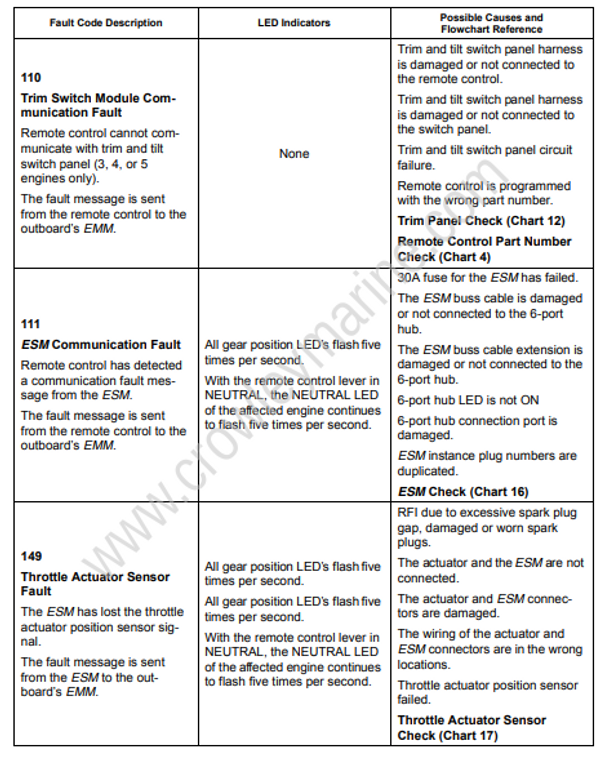
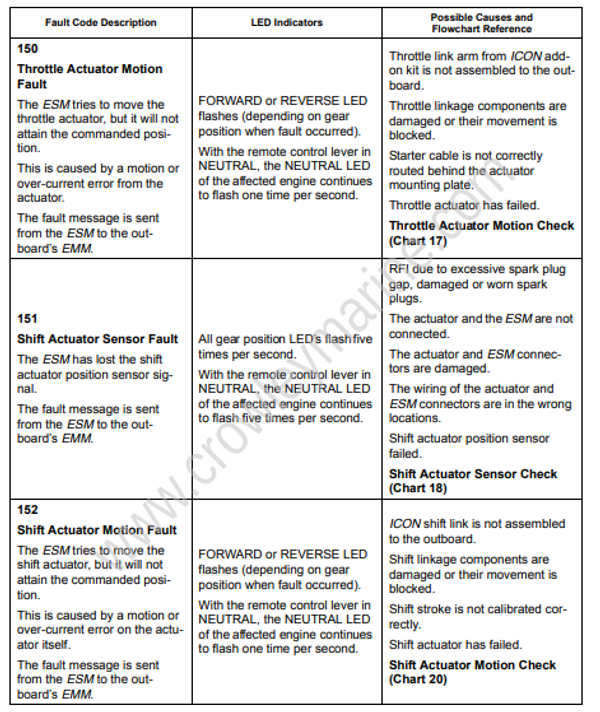
ICON System Fault Code Chart
Use this chart and Evinrude Diagnostics software to identify ICON Remote Control System fault codes.
Use the ICON System Troubleshooting Flowcharts to resolve a problem on an ICON System. Refer to the Evinrude ICON System Troubleshooting Guide.