

EMM DIAGNOSTICS
Access EMM information using the EMM’s LED indicators and the diagnostic program.
EMM turned ON is verified through LED display or communication with diagnostic software.
To access EMM information using the diagnostic software, connect interface cable to diagnostic plug and turn key switch ON. Battery cables and battery must be connected to supply power to EMM.
LED Indicators
Activation of LED indicators on the EMM correspond to specific EMM circuits.
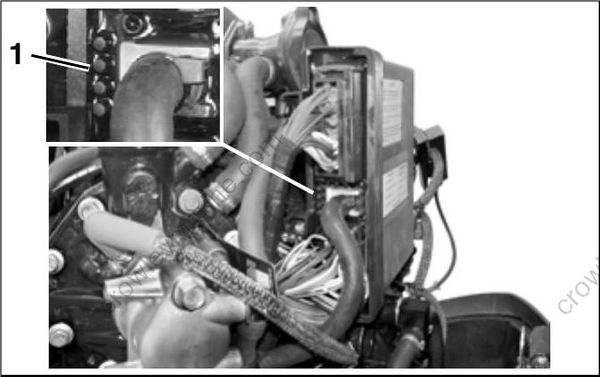
- LED indicators
IMPORTANT: LED 1 is top (HIGHEST) LED and LED 4 is bottom (LOWEST) LED.
Starting Mode
Light ON indicates system is functioning properly.
- LED 1 – Light ON, Stator signal 30 V or higher, “CHARGING OKAY”
- LED 2 – Light ON, CPS output, “CRANK POSITION OKAY”
- LED 3 – Light ON, Sensor/5 V circuits, “SENSORS OKAY”
- LED 4 – Light ON, Lanyard/Stop circuit not grounded, “LANYARD/STOP OKAY”
Refer to EMM DIAGNOSTICS on p. 104 for additional diagnostic information.
Running Mode
Light ON indicates system is MALFUNCTIONING.
- LED 1 – Light ON, charging output malfunction 12 V or 55 V circuit; or SAC overcurrent “CHARGING FAULT”
- LED 2 – Light ON, Injector or ignition circuit malfunction, “INJECTOR/IGNITION FAULT”
- LED 3 – Light ON, Sensor/5 V circuits, “SENSOR FAULT”
- LED 4 – Light ON, “NO OIL/OVERHEAT FAULT”
Refer to EMM DIAGNOSTICS on p. 104 for additional diagnostic information.
Software Programs
The Evinrude Diagnostics Software program can be used to communicate with the EMM Communication also requires a 12 V supply to power up the EMM.
Refer to EMM DIAGNOSTICS on p. 104 for additional diagnostic information. Identify and resolve all problems related to Stored Faults/Codes prior to clearing the codes.
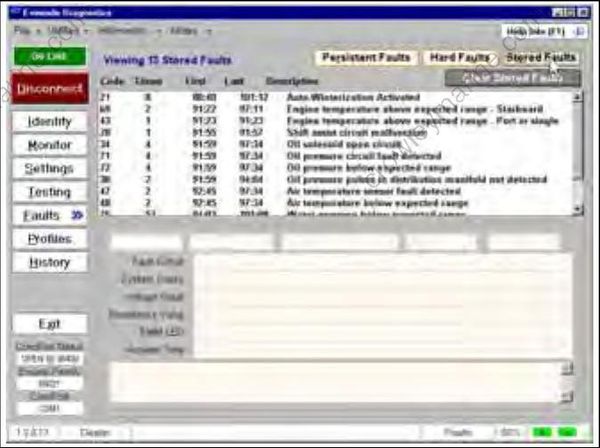
Stored Faults Review Screen
