

ELECTRICAL AND IGNITION
LOW OIL Circuit Test
Turn the key switch ON. Using a jumper wire, connect tan/black wire (pin 4) of the engine harness connector to a clean engine ground. The LOW OIL light should turn on after 40 seconds.
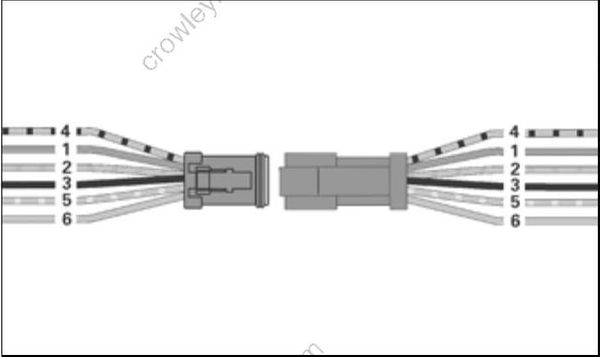
If the LOW OIL light does not turn on after connecting the terminal to ground, test circuit for continuity.
Turn the key switch OFF and reconnect all disconnected circuits.
NO OIL Circuit
Separate the 6-pin SystemCheck connector of MWS instrument harness from engine harness. Black wire (pin 3) must be grounded.
Using a jumper wire, connect tan/yellow wire (pin 5) to a clean engine ground.
Turn the key switch ON. After the normal self-test sequence, the NO OIL light should stay on.
If the NO OIL light is not on, test circuit for continuity. Test for continuity of the MWS instrument harness (tan/yellow wire).
Test for continuity of the engine wire harness between terminal 5 (tan/yellow wire) of the SystemCheck connector and pin 24 of the EMM J1 A connector.
Turn the key switch OFF and reconnect all disconnected circuits.
REMOTE CONTROL SWITCH TESTS
Key Switch Test
Refer to Wiring Diagrams at back of manual.
Use an ohmmeter or a continuity light to test key switch operation. Replace switch if results are incorrect with any of the following tests.
Disconnect battery and key switch wiring before proceeding with the following tests.
STEP 1
Stop/Ground Terminals (M) – Connect meter between the two “M” terminals. Meter must indicate NO continuity at START or ON.
Turn key switch OFF. Meter must indicate continuity.
STEP 2
Accessory Terminal (A) – Make sure the key switch is OFF. Connect the ohmmeter or continuity light between terminals “B” (battery) and “A” (accessory) of key switch. Meter must indicate NO continuity.
Turn switch ON. Meter must indicate continuity.
Turn key switch to START. Meter must continue to indicate continuity.
STEP 3
Starter Terminal (S) – Hold key switch at START. Connect meter between terminal “B” and terminal “S.” Meter should indicate continuity.
The choke function or terminal “C” of the key switch is NOT used.
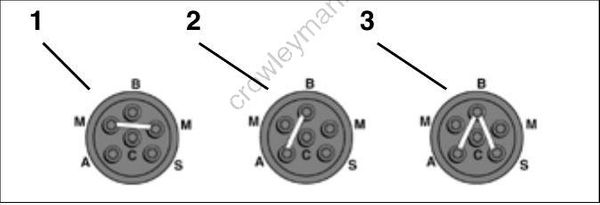
- OFF
- ON
- START
Neutral Start Circuit Test
Use an ohmmeter or continuity light to test the continuity of the circuit while positioning the remote control in NEUTRAL, FORWARD, and REVERSE.
Turn propeller shaft or disconnect shift cable to allow proper remote control shift action while outboard is not running. Disconnect the MWS instrument harness connector from the key switch harness connector.
Make sure the remote control handle is in NEUTRAL. Connect meter between terminal 5 (red/purple wire) and terminal 2 (yellow/red wire). Turn the key switch to START. Meter must indicate continuity.
Move the remote control handle to FORWARD and turn the key switch to START. Meter must NOT indicate continuity.
Move the remote control handle to REVERSE and turn the key switch to START. Meter must NOT indicate continuity.
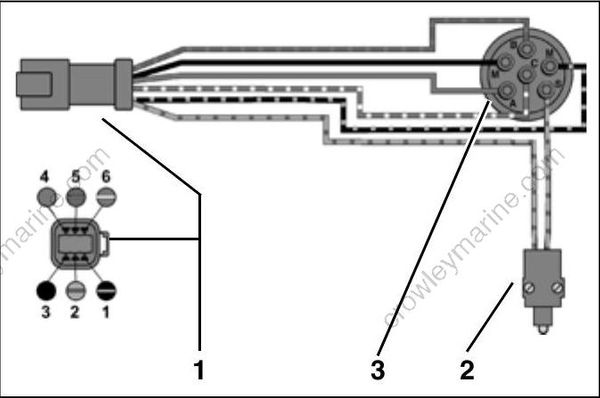
- Key switch harness connector
- Neutral start switch
- Key switch
Reconnect shift cable and MWS instrument harness connector to key switch harness connector.
Neutral Start Switch Test
Use an ohmmeter or a continuity light to test neutral start switch operation.
All wiring must be disconnected from the switch before proceeding with this test.
Disassemble the remote control and remove the neutral start switch.
Connect one meter lead to each terminal of the switch.
- Meter must indicate continuity when the plunger is depressed
- Meter must indicate no continuity when the plunger is released.
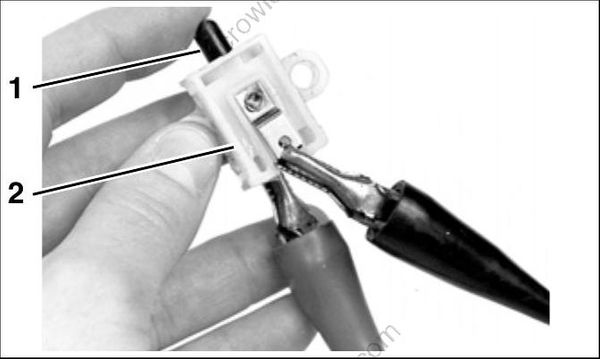
TYPICAL
- Plunger
- Neutral start switch
Replace switch if results are incorrect.
Emergency Stop Switch Test
This switch can be incorporated into the key switch or installed as a separate switch. Either style effectively connects the “M” terminals of the key switch.
The emergency stop switch function grounds the stop circuit wire (black/yellow) when the lanyard clip is removed. One “M” terminal is the ground wire (black) and one “M” terminal is the stop circuit wire (black/yellow).
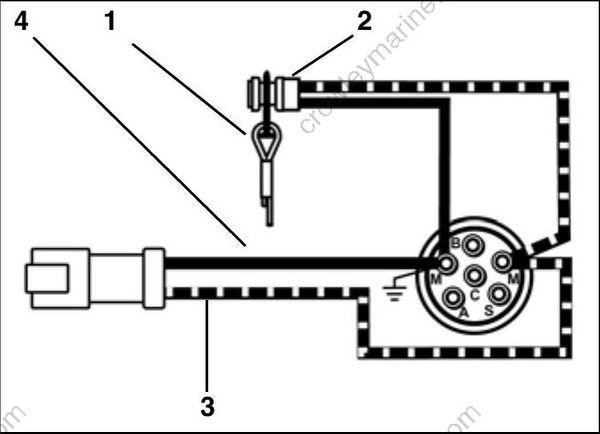
- Lanyard and clip assembly
- Emergency stop switch, separate from key switch
- Stop circuit wire (black/yellow)
- Ground wire (black)
Install the clip on the emergency stop switch or key switch. Start the outboard. Pull the clip from the switch. The outboard must stop running.
TACHOMETER CIRCUIT TESTS
Check voltage at the battery. Use this reading as a reference for battery voltage.
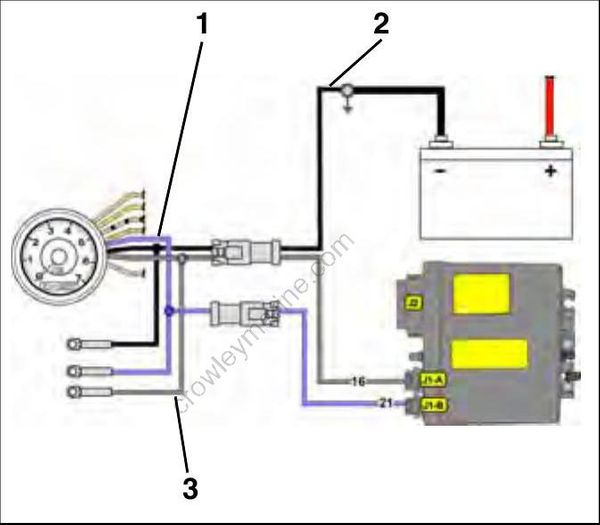
- Purple lead
- Black lead
- Gray lead
STEP 1
Connect the red meter lead to the tachometer purple wire and the black meter lead to the tachometer black wire (key ON, outboard NOT running).
- If meter shows battery voltage, go to STEP 2.
- If meter shows less than battery voltage, check the purple, red/purple, and black wiring circuits, fuse, key switch, and battery connections.
STEP 2
Disconnect gray and black wires at tachometer. Set Fluke 29 Series II meter, or equivalent, to Hz scale. Connect meter between gray wire and black wire. With outboard running at 1000 RPM, meter should indicate 90 to 105 Hz.
- If meter reads 90 to 105 Hz, replace tachometer.
- If meter reads low or no signal, confirm output on gray wire at pin 16 of EMM J1-A connector.
– Reading OK – Check condition of tachometer circuit (gray wire). Repair as needed.
– Reading not OK – Check connection at EMM; replace faulty EMM.
