

Outboard
Press the Outboard button or the Outboard icon to access the Outboard screen. This screen displays data for the selected outboard.
Touch an outboard icon on the screen to view data from the selected outboard. Port data is highlighted in red, starboard data is highlighted in green.
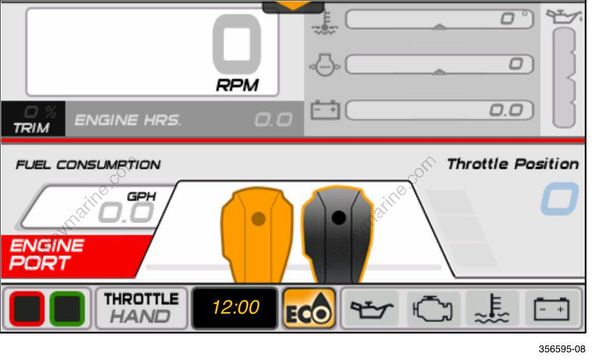
The data shown is:
RPM, Trim, Engine Hours
Coolant Temperature
Water Pressure
Battery Voltage
Oil Level (from the outboard-mounted oil tank)
The oil level reading is not available when the outboard is in the tilt range.
Fuel Consumption (for the selected outboard only)
Throttle Position
| Problem | Solution | |
|---|---|---|
| Data Display Troubleshooting Tip | Data does not display for the selected engine. | Verify the engine instance setting; use Evinrude Diagnostic software (see your dealer). Verify that the public network is connected to the outboard. |
