

OILING SYSTEM
Check valves pressed into the crankcase below #4 and #6 reed valve assemblies connect to hoses which route to a fitting at the top of the block, above #2 cylinder.
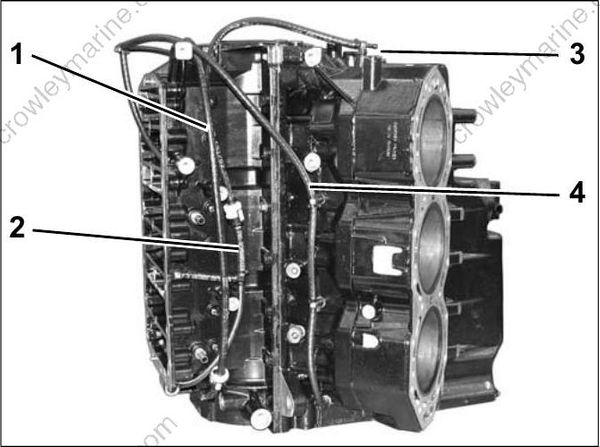
- Lower to upper main bearing oiling circuit
- Idle oil circuit
- Tee fitting
- Cylinder recirculation circuit
Crankcase / Main Bearing Recirculation
The movement of oil through the main bearings is controlled by internal passages, external fitting s and hoses, and an in-line check valve.
Both center main bearings receive oil through grooved passages in the crankcase. Oil migrate s to the bearings from the crankcase areas of the higher cylinders.
The lower main bearing receives oil through a grooved passage in the crankcase.
Lower to upper main bearing oil flow
Oil moves from the lower main bearing cavity through an internal crankcase passage to an external fitting. External hoses with an in-line check valve connect to a fitting at the upper main bearing, which leads to the upper main bearing through an internal crankcase passage.
OIL CONTROL SETTINGS
Oil Injection Rate
The Engine Management Module (EMM) controls the oil injection rate based on engine RPM. This rate can be adjusted for the type of oil being used, and also for powerhead break-in. Use Evinrude Diagnostics software to access these features.
The Set Oil Type option controls the injection rate for the oil being used and typical operating conditions.
The TC-W3 oil type setting is the standard setting for all outboards. Set TC-W3 for:
- Operation with all TC-W3 outboard oils including XD30, XD50, or XD100.
- Applications requiring maximum lubrication.
- Extreme applications (commercial or harsh conditions, racing or other high performance operation).
- Use this setting with XD100 outboard oil in extreme applications
The XD100 setting provides an option to run the outboard at a reduced oil injection rate. This set ting REQUIRES the use of Evinrude XD100 out board lubricant and is not recommended for all applications.
IMPORTANT: The XD100 setting is not avail able on all models.
Use the XD100 setting for:
- Conventional use (runabouts, cruisers)
- Moderate applications
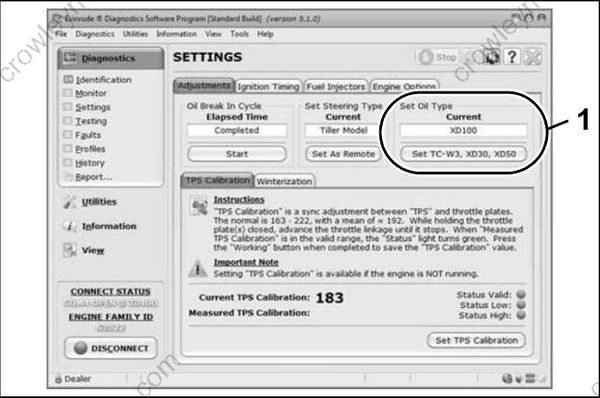
- Oil control setting
Running a n Evinrude E-TEC out- board on other grades of oil while set to the XD100 oil ratio will result in increased engine wear and shortened outboard life.
Powerhead oil programming labels are provided to identify EMM oil programming. Install the correct label to alert user to specific oil requirements.
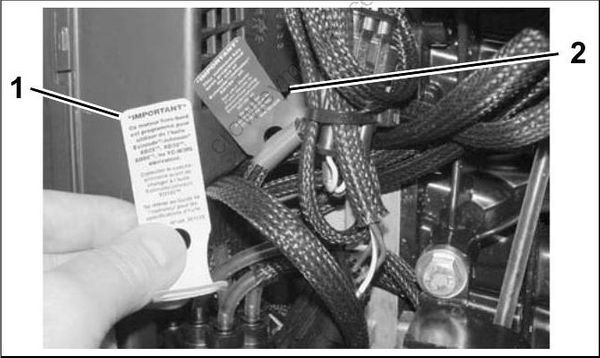
- Evinrude/Johnson XD30 outboard lubricant (TC-W3)
YELLOW label - Evinrude/Johnson XD100 outboard lubricant (Premium)
BLUE label (Installed)
An XD100 Outboard Oil De cal, P/N 352369, is available to label boats equipped with outboards that have been programmed for the reduced oil injection ratio.
This outboard has been programmed for the use of Evinrude ® /Johnson® XD100™ outboard oil ONLY.
Failure to use Evinrude ®/Johnson® XD100™ outboard oil may harm engine performance and shorten engine life.
XD100 Outboard Oil Decal
Install decals in a highly visible location, such as one of the following:
- Dashboard/deck of boat, next to key switch
- Deck of boat, next to the remote oil fill
- Deck of boat, next to oil tank assembly
- Oil tank cover
- Cover of oil tank compartment
- Attach to oil tank or oil fill cap.
IMPORTANT: Make sure the engine label an d boat decals match EMM programming.
Break-In Oiling
IMPORTANT: DO NOT add oil in the fuel tank on Evinrude E-TEC models.
The EMM automatically supp lies extra oil to the engine as follows:
- 90° V6: First two hours above 2000 RPM
Follow these steps for outboard set-up:
Use Evinrude Diagnostics software to make sure the break-in program has been started on a new outboard.
- Use the diagnostics software to start break-in oiling after a powerhead rebuild.
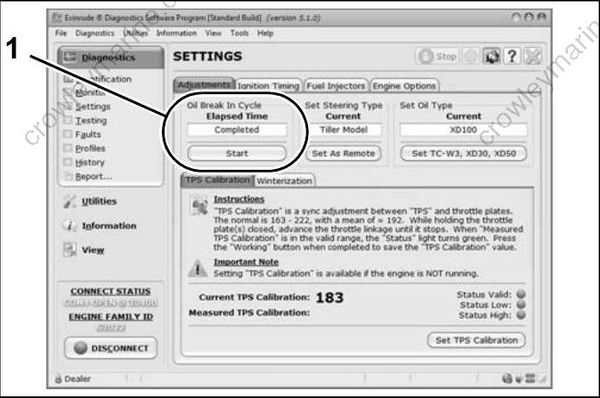
- Break-in oil setting
The operator must monitor the oil tank level to confirm oil consumption. This may require several hours of operation above idle.
