

Operational Checks
DO NOT run the engine indoors or without adequate ventilation or permit exhaust fumes to accumulate in confined areas. Engine exhaust contains carbon monoxide which, if inhaled, can cause serious brain damage or death.
Contact with a rotating propeller is likely to result in serious injury or death. Assure the engine and prop area is clear of people and objects before starting engine or operating boat. Do not allow anyone near a propeller, even when the engine is off. Blades can be sharp and the propeller can continue to turn even after the engine is off.
DO NOT run outboard without a water supply to the outboard’s cooling system. Cooling system and/or powerhead damage could occur.
Engine Monitoring System
Attach emergency stop lanyard.
SystemCheck
Turn key switch to ON. Warning horn should
sound for 1/2 second.
All SystemCheck warning lights should turn on at
the same time, then turn off one at a time.
I-Command
Turn key switch to ON.
The Evinrude E-TEC screen should appear, followed by the tachometer display.
Fuel System
Perform running checks of the fuel system by following these steps:
• Squeeze fuel primer bulb until hard or activate electric primer. Observe all fuel hoses and connections. Repair any leaks.
• Start outboard. Inspect all hoses and connections. Repair any leaks or misrouted hoses immediately.
Emergency Stop / Key Switch
Check emergency stop function. With outboard running at IDLE, pull safety lanyard from emergency stop switch. Outboard must stop immediately.
Remote Control Operation
Make sure that control can be easily moved into all gear and throttle settings. Do not shift remote control when outboard is not running.
Start-In-Gear Prevention
Make certain that the starter will not operate when the outboard is in gear. The startin-gear prevention feature is required by the United States Coast Guard to help prevent personal injuries.
Start outboard and shift to FORWARD.
Turn outboard OFF while control is in FORWARD.
Try to restart the outboard. Outboard should not start.
Shift back to NEUTRAL and restart outboard.
Shift to REVERSE. Turn outboard OFF while control is in REVERSE.
Try to restart the outboard. Outboard should not start.
Tachometer Pulse Setting
Confirm accuracy of tachometer reading.
• Adjust dial on back of tachometer to required setting (the outboard should not be running).
| Outboard Model | Tachometer Setting |
|---|---|
| 115–200 HP | 6 Pulse or 12 Pole |
Water Pump Overboard Indicator
A steady stream of water should flow from the overboard indicator.
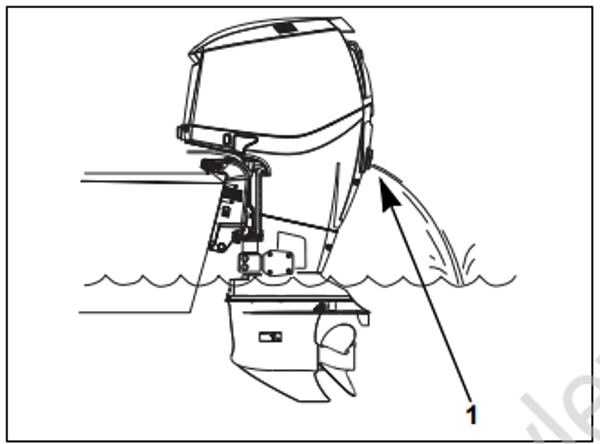
008469A
- Water pump overboard indicator
Operating Temperature
An outboard run at idle speed should achieve a temperature based on the engine’s thermostatic control. In general, the powerhead temperature should reach at least 104°F (40°C) after five minutes of idling. Check that the powerhead reached idle temperature. Refer to SERVICE SPECIFICATIONS on p. 10.
Idle Speed
Make sure the outboard idles within the specified idle RPM range. If the outboard is run on a flushing device, the idle speed and quality may not be representative of actual in water use.
Cooling System
Check the condition of cooling system components regularly:
water intake screens
water pump
all internal water passages
thermostats
all external water hoses and fittings
vapor separator cooling passages and fittings
EMM cooling passages and fittings
overboard water pressure indicator.
Water Intake Screens
Inspect condition of water intake screens. Clean or replace as needed.
Confirm function of overboard water pressure indicator.
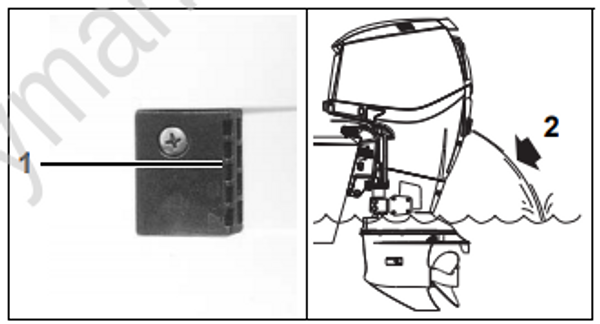
DSC02220a / 008470A
- Water intake screen
- Overboard indicator
Engine Flushing
Flush the outboard with fresh water following each use in brackish, salt, or polluted water to minimize the accumulation of scale and silt deposits in cooling system passages.
The outboard can be flushed on the trailer or at dockside; running or not running.
IMPORTANT: The outboard must be located in a well ventilated area with appropriate ground drainage during the flushing procedures.
Keep water inlet pressure between 20 to 40 psi (140 to 275 kPa).
