

System Check CIRCUIT TESTS
Make sure the SystemCheck engine monitor can warn the operator during a “NO OIL,” “WATER TEMP” or “HOT,” “CHECK ENGINE,” or “LOW OIL” condition. Check the condition of the warning system and associated wiring and connections. Test the engine monitor regularly and anytime you suspect an alert situation has been missed.
The instrument harness must be connected to the outboard before performing the following tests. Refer to the Engine Wiring diagram and the MWS Instrument Wiring diagram in the back of this manual.
IMPORTANT: Use jumper wires made with the appropriate terminals to test the warning circuits.
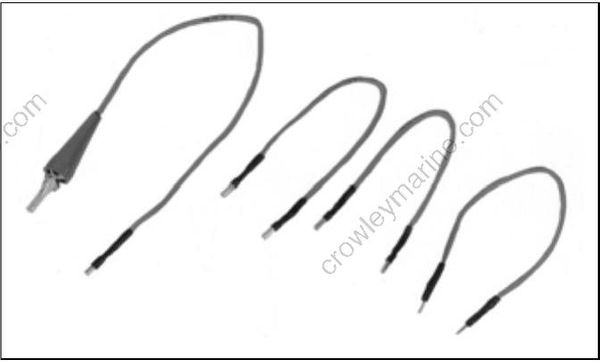
Gauge Self-Test Check
Turn the key switch to ON with the outboard NOT running. The gauge warning lights for NO OIL, WATER TEMP, CHECK ENGINE, and LOW OIL must all light at once, then turn off in sequence, and the warning horn must sound for one-half second.
If the gauge lights do not turn on, turn the key switch OFF. Disconnect the gauge 8-pin connector from the back of the gauge and turn the key switch ON. Test for battery voltage between instrument harness terminal 1 (purple wire) and terminal 2 (black wire).
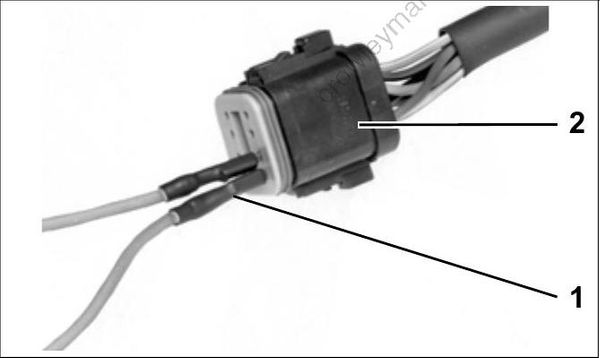
- Test adapter(s)
- Connector, SystemCheck gauge
- If battery voltage is present, replace the gauge.
- If there is no battery voltage, check that 12 V is present at terminal “B” of the key switch. Check condition of the instrument harness, key switch, and connections.
If the lights worked, but the warning horn did not sound for one-half second, turn the key switch OFF. Disconnect the warning horn 2-pin connector. Substitute a known good warning horn. Turn the key switch ON.
- If the substitute horn beeps, the original horn is defective and must be replaced.
- If the substitute horn does not beep, check for battery voltage between instrument harness 2 pin connector, terminal 2 (purple wire) and ground with the key switch ON. Also, check the tan/blue wire for continuity between pin 8 of the 8-pin connector and pin 1 of the 2-pin connector.
- If battery voltage is present at the purple wire and the tan/blue wire has continuity between two connectors, replace SystemCheck the gauge.
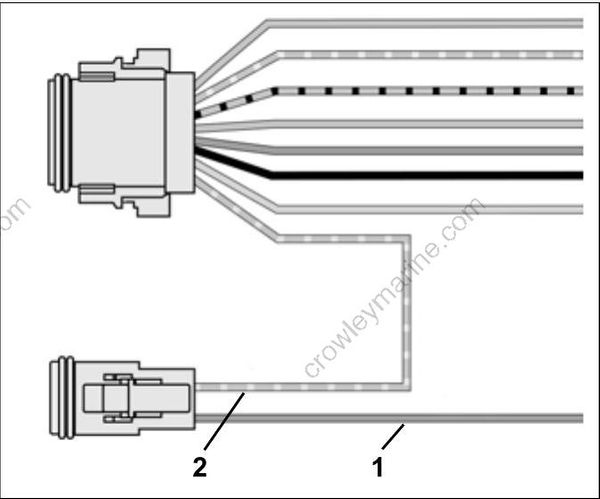
- Purple wire
- Tan/blue wire
Turn the key switch OFF and reconnect all disconnected circuits.
CHECK ENGINE Circuit Test
Separate the 6-pin SystemCheck connector of MWS instrument harness from engine harness. Black wire (pin 3) must be grounded.
Using a jumper wire, connect tan/orange wire (pin 2) to a clean engine ground.
Turn the key switch ON. After the normal self-test sequence, the CHECK ENGINE light should stay on.
- If the CHECK ENGINE light is not on, test circuit for continuity. Check continuity of the MWS instrument harness (tan/orange wire).
- Check continuity of the engine wire harness between terminal 2 (tan/orange wire) of the SystemCheck connector and pin 17 of the EMM J1-A connector.
Turn the key switch OFF and reconnect all disconnected circuits.
WATER TEMP/ HOT Circuit Test
The tan wire of engine harness and the MWS harness receives a signal from the EMM.
The EMM receives information from the temperature sensor on the cylinder head.
Using a jumper wire, connect tan wire (pin 6) of the engine harness connector to a clean engine ground.
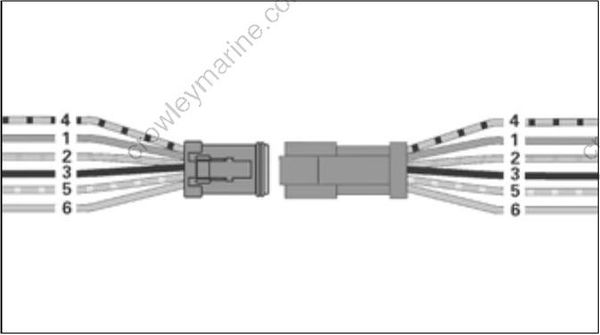
Turn the key switch ON. After the normal self-test sequence, the gauge WATER TEMP / HOT indicator should stay on.
- If LED is not on, test circuit for continuity. Test for continuity of both the engine harness (tan wire) and the MWS instrument harness (tan wire).
Turn the key switch OFF and reconnect all discon nected circuits.
IMPORTANT: To test the temperature sensor itself, refer to Engine Temperature Sensor Test on p. 14
LOW OIL Circuit Test
Turn the key switch ON. Using a jumper wire, connect tan/black wire (pin 4) of the engine harness connector to a clean engine ground. The LOW OIL light should turn on after 40 seconds.
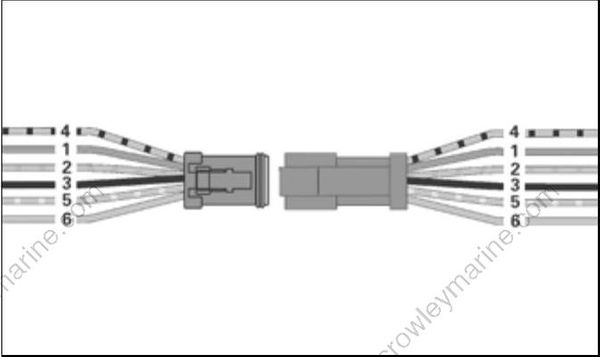
002079 If the LOW OIL light does not turn on after connecting the terminal to ground, test circuit for continuity.
Turn the key switch OFF and reconnect all disconnected circuits.
NO OIL Circuit
Separate the 6-pin SystemCheck connector of MWS instrument harness from engine harness. Black wire (pin 3) must be grounded.
Using a jumper wire, connect tan/yellow wire (pin 5) to a clean engine ground.
Turn the key switch ON. After the normal self-test sequence, the NO OIL light should stay on.
- If the NO OIL light is not on, test circuit for continuity. Test for continuity of the MWS instrument harness (tan/yellow wire).
- Test for continuity of the engine wire harness between terminal 5 (tan/yellow wire) of the SystemCheck connector and pin 24 of the EMM J1 A connector.
Turn the key switch OFF and reconnect all disconnected circuits.
TACHOMETER CIRCUIT TESTS
Check voltage at the battery. Use this reading as a reference for battery voltage.

- Purple lead
- Black lead
- Gray lead
Connect the red meter lead to the tachometer purple wire and the black meter lead to the tachometer black wire (key ON, outboard NOT running).
- If meter shows battery voltage, go to next step.
- If meter shows less than battery voltage, check the purple, red/purple, and black wiring circuits; fuse, key switch, and battery connections.
Disconnect gray and black wires at tachometer. Set Fluke 29 Series II meter, or equivalent, to Hz scale. Connect meter between gray wire and black wire. With outboard running at 1000 RPM, meter should indicate 90 to 105 Hz.
- If meter reads 90 to 105 Hz, replace tachometer.
- If meter reads low or no signal, confirm output on gray wire at pin 16 of EMM J1-A connector.
– Reading OK – Check condition of tachometer circuit (gray wire). Repair as needed.
– Reading not OK – Check connection at EMM; replace faulty EMM.
