

Timing Pointer
The timing pointer must be adjusted to indicate top dead center (TDC) of the number 1 piston. This reference to the position of the number 1 pis ton is used to synchronize the electronic timing controlled by the EMM with the mechanical position of the number 1 piston.
Use the Evinrude Diagnostics Software program to verify and adjust timing. Refer to the software’s help system for outboard timing verification procedures.
To prevent accidental starting while servicing, disconnect the battery cables at the battery. Twist and remove all spark plug leads.
Disconnect the battery cables at the battery.
Remove spark plugs. Rotate the flywheel clock wise to 30° ATDC.
Install Piston Stop Tool, P/N 342679, into the spark plug hole of the number 1 cylinder.
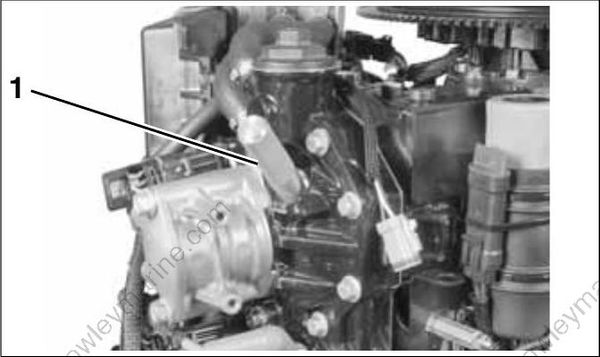
- Piston stop tool
Rotate flywheel counterclockwise until the number 1 piston contacts the tool. Keep pressure on the flywheel to position the piston firmly against the tool. Mark the flywheel directly across from the pointer. Label this mark “A.”
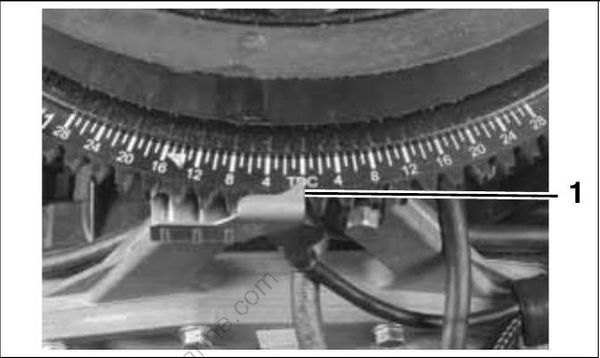
- Timing pointer
Rotate the flywheel clockwise until the piston contacts the tool. Mark the flywheel directly across from the pointer. Label this mark “B.” Rotate fly wheel counterclockwise slightly to release tool then remove it from spark plug hole.
Use a flexible measuring device to measure the distance between marks “A” and “B.” Measure along the edge of the flywheel. Mark the midpoint on the flywheel. Label this mark “C.”
If mark “C” and the cast-in TDC boss on flywheel are in alignment, the timing pointer is in the correct location.
If the pointer alignment is NOT correct, rotate the flywheel clockwise to align the mark “C” with the pointer. Hold the flywheel in this position. Loosen the pointer retaining screw and adjust the pointer location to align with the cast-in TDC boss on the flywheel. Tighten retaining screw.
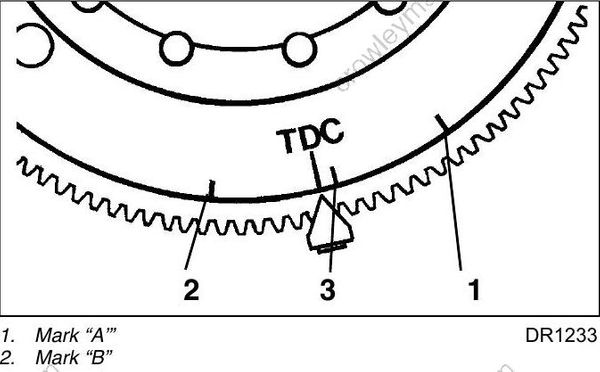
- Mark “A’”
- Mark “B”
- Mark “C
Repeat the entire adjustment process to make sure pointer is aligned correctly.
Install spark plugs. Refer to Spark Plug Indexing on p. 82.
Timing Verification
Use Evinrude Diagnostics software to synchronize the mechanical timing of the outboard with the electronic timing of the EMM .
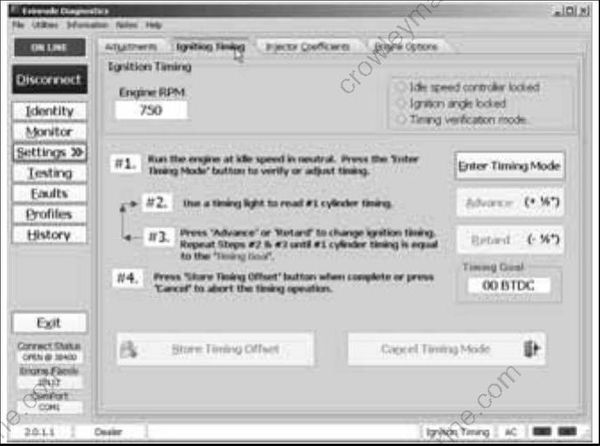
Timing Adjustment Screen
Check ignition timing after any of the following procedures:
• Powerhead replacement
• Crankshaft replacement
• Flywheel removal or replacement
• CPS replacement
• EMM replacement
• EMM software replacement (reprogramming)
IMPORTANT: Make sure the timing pointer is set and the outboard reaches operating temperature before timing verification is performed.
TPS CALIBRATION
Use Evinrude Diagnostics software to tell the EMM what throttle position sensor voltage is when the throttle plates begin to open. Remove the air silencer.
On the Settings screen of the diagnostic software, click the “Set TPS Calibration” button.
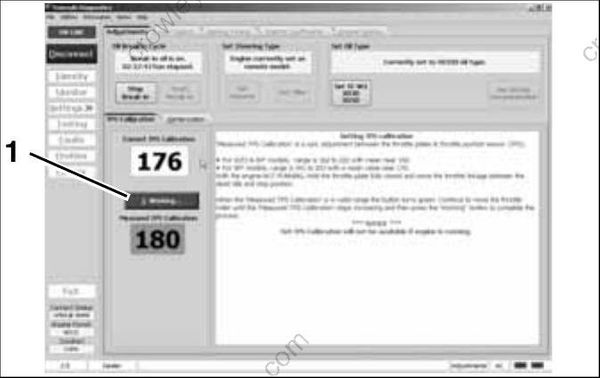
- TPS Calibration button
While holding the throttle plates closed, advance the throttle linkage until it stops. The “Measured TPS Calibration” field on the screen will increase. Click the “Working” button in the software to calibrate the TPS.
Install the air silencer.
Set TPS Calibration after replacing or adjusting any throttle body or throttle linkage parts.
