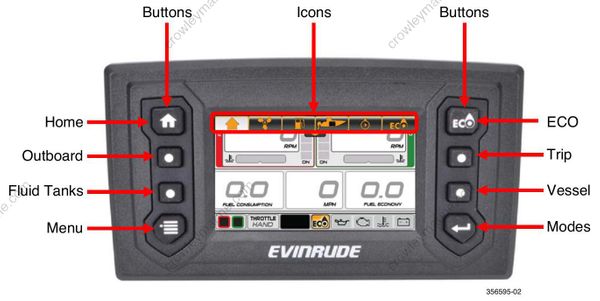
OE Evinrude ICON 4.3 CTS Digital Display User's Guide
A pop-up and audible warning if equipped with Horn Kit Assembly, P/N 176361, will remain in effect until acknowledged by the operator by touching the pop-up area. As long as the fault is active, the pop-up may be re-initiated by touching the right-hand side of the Outboard Status Indicator area of the Status Bar.
Turning the Display ON
Turn the key switch to the ON position or start the outboard to turn the display ON.
| Problem | Solution | |
|---|---|---|
| Troubleshooting Tip | Display does not power ON | Charge the network power supply battery to a minimum of 12.5 V Disconnect wiring harness from back of gauge, and then securely reconnect it. |
Using the Display
Use the Quick Access buttons to access a screen. Use the on-screen Touch Point icons to access a screen or select a specific feature.
Quick Access Buttons and Icons
Press a button or on-screen icon to access its associated screen.