PREPARE FOR WINTER: 10-50% discount on all OEM parts!

Unless prohibited by manufacturer. Does not include aftermarket or Crowley Marine branded products. Priced as marked.

Our warehouses are closed on Thursday and Friday, November 26th and 27th. Happy Thanksgiving!

Search Over 1 Million OEM Parts
Easy-to-use  parts diagrams Best price  guarantee Expert  live support 50+ years  of serving boaters Huge selection of OEM parts  -  from 1950 to 2026 Most parts in stock  -  Same day fulfillment
Most parts in stock- Same day fulfillment

OE Evinrude ICON 4.3 CTS Digital Display User's Guide Rev A. (P-N 356595) Screen Features [Modes]

Related Products:
OE Evinrude ICON 4.3 CTS Digital Display User's Guide Rev A. (P-N 356595) Screen Features [Modes]
0356595
BRP Marine

Modes

Press the Modes button or the Modes icon on the Menu screen to access the Modes screen.
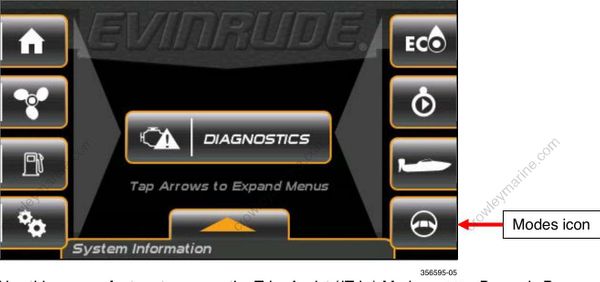
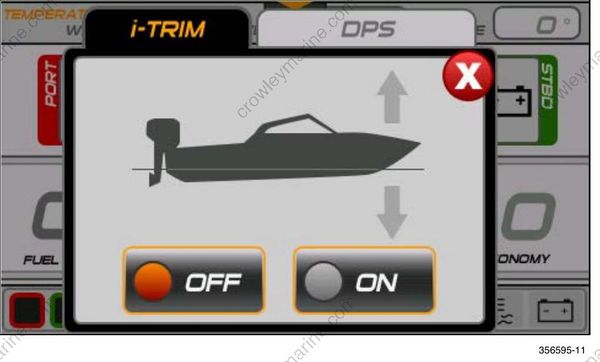
Use this pop-up feature to access the Trim Assist (iTrim) Mode and the Dynamic Power Steering (DPS) Assist Mode. The display will default to the iTrim mode pop-up screen.

Trim Assist (iTrim) Mode

Touch the on-screen icons to change the mode. The change is applied to all outboards in the system. The selections include OFF or ON.
Dynamic Power Steering (DPS) Assist Mode

Touch the DPS icon to access the DPS mode pop-up screen.

Touch the on-screen icons to change the modes. The change is applied to all outboards in the system. The selections include Minimum, Medium, and Maximum
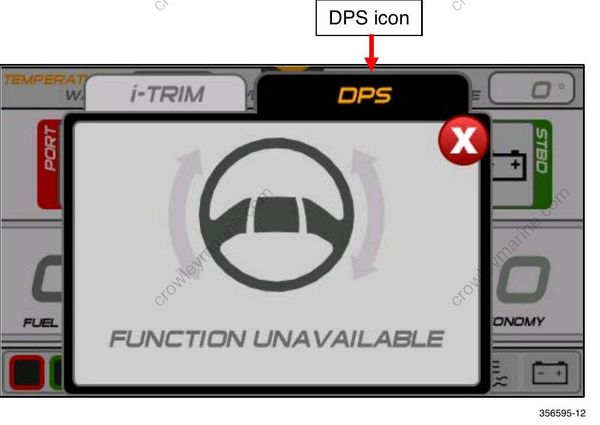
Power Steering Assist is only active for models which have Dynamic Power Steering.

Share on social:

Related Products